Psychrometric Calculator
- 0.0
- Rating
- 10.00K
- Installs
- Free
- Price

 Analysis by App-foxy
I found Psychrometric Calculator to be a focused technical tool rather than a general-purpose weather or HVAC app. Its job is to help me work with air-condition relationships through a psychrometric chart, and it stays close to that purpose. That narrow focus is its biggest strength: when I need to reason about moisture, temperature, and air treatment together, a dedicated calculator is more useful than a standard weather app. It is also the reason many casual users will have little use for it.
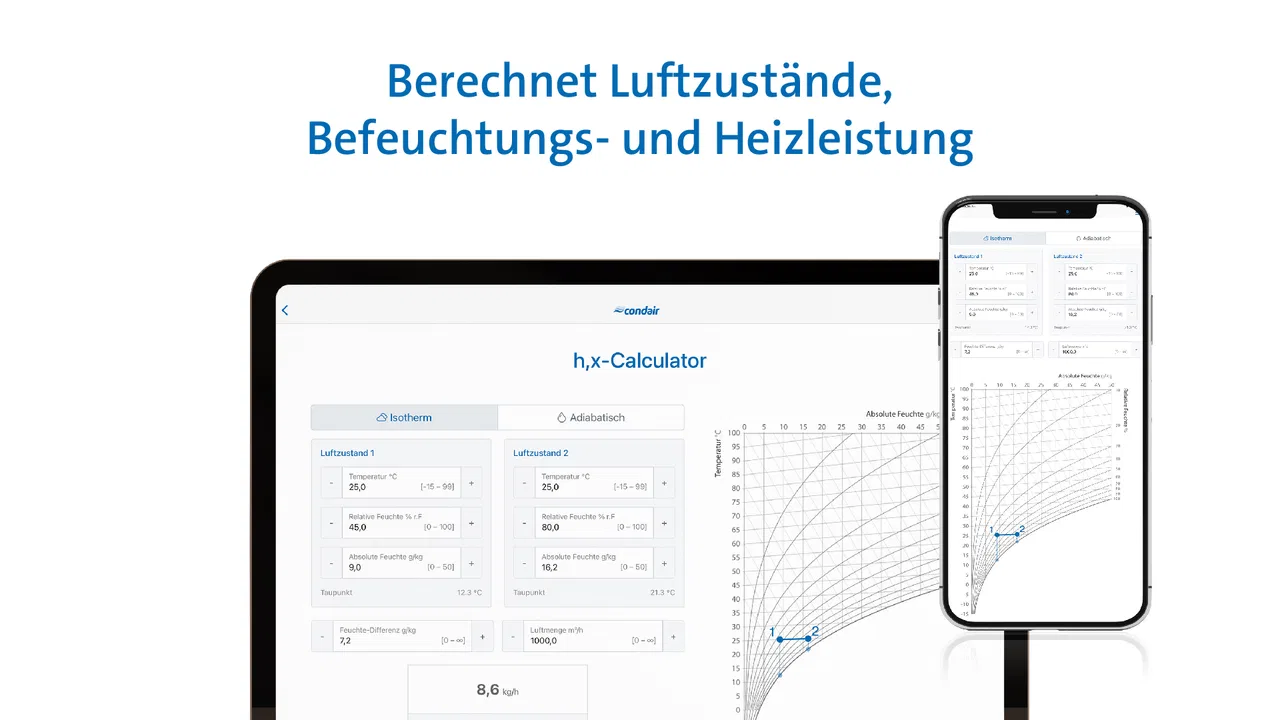
Developed by Condair GmbH, this free Android app sits in the Libraries & Demo category and is suitable for Everyone. It is available from Android 5.1 onward, with version 0.2.1 currently associated with the app. The store summary describes it as a calculation tool for air conditions in the Psychrometric Chart, which is an accurate description of the experience I had: this is a compact reference and calculation aid for people who already understand, or are actively learning, the language of air conditioning.
A practical look at Psychrometric Calculator
I’ll look at what makes Psychrometric Calculator useful for a focused air-condition question, rather than treating it as a general humidity or weather tool. I’ll also consider the practical choice behind installing it: whether a compact chart-based calculator suits your workflow, or whether a broader reference would serve you better.
You May Also Like

 Blood Strike: 2.5 Anniversary
Blood Strike’s Loadouts Turn Every Drop Into a Tactical Gamble
A close look at Blood Strike’s custom loadouts: how fast access to signature weapons reshapes its battle royale rhythm, rewards preparation, and narrows the gap between fights.

 Pandora - Music & Podcasts
Pandora’s Music Is Easy to Start, but Harder to Recover
Pandora’s strength is its low-effort path from a seed to a station. Its weak spot is how much confidence it asks you to place in connection, setup, and quiet recovery.

 8 Ball Pool
 Is Built on Rivalries, Rematches, and Routine
A close look at the rivalries, rematches, shared routines, and unanswered safety questions that turn a quick pool match into a persistent mobile community.

 Samsung Music
’s Quiet Strength Is Playing What You Already Own
Its reach comes less from spectacle than from dependable access to a personal library. That simplicity is both the app’s strongest retention engine and its ceiling.

 AccuWeather: Weather Radar
AccuWeather Review: A Quick, Clear Forecast for Everyday Decisions
For everyday plans, the best forecast is the one you can understand quickly. AccuWeather makes rain timing, radar, and local conditions easy to act on, with a few trade-offs.

 Hill Climb Racing
Why Hill Climb Racing Still Turns Crashes Into One More Run
A tiny car, a bumpy hill and one more upgrade: Hill Climb Racing keeps resurfacing because its simple chaos makes every near-miss feel personal.
More From Our News Desk
View All News


A clear tool for a specialized problem
The first thing I noticed is that the app is not trying to become a full building-management package. It does not present itself as a replacement for design software, a commissioning instrument, or a complete HVAC planning suite. Instead, it gives the psychrometric chart a more practical role in day-to-day calculations. That makes it useful when I want to examine how a change in one air condition affects the others without reaching for a printed chart or a more elaborate desktop program.
A psychrometric chart can feel intimidating because several properties share the same diagram. Dry-bulb temperature, moisture content, relative humidity, enthalpy, and related air conditions are connected visually, but reading the chart accurately takes practice. A calculator built around that chart can reduce the mechanical work and let me concentrate on interpreting the result. For students, technicians, and engineers, that is a meaningful advantage.
The app’s value is therefore less about entertainment or convenience in the usual mobile sense and more about reducing friction in a technical workflow. I can imagine opening it during a lesson, while checking a ventilation concept, or when explaining why heating air changes relative humidity even when no moisture is added. It is the kind of app that may sit unused for weeks and then become genuinely helpful for a specific question.
Where it fits into real work
One realistic scenario is a small office with complaints about dry air during a heating period. I might use the app to compare the starting indoor condition with the condition after sensible heating. The chart helps show that warmer air can have a lower relative humidity even if its moisture content has not changed. That distinction is easy to miss when looking only at a percentage on a wall-mounted sensor.
Another situation is checking the logic of an air-treatment sequence before discussing it with a colleague. If air is heated, cooled, humidified, or dehumidified, the psychrometric chart provides a way to visualize the direction of travel. The app is useful here as a quick thinking aid. It can help me catch an obviously inconsistent assumption before I spend time building a larger calculation around it.
I also see a good educational use. A learner can enter or inspect air conditions, then compare the chart position with what a textbook says should happen. That is more valuable than memorizing isolated formulas because it connects the numerical result to a physical process. The app does not remove the need to understand the chart; it gives that understanding somewhere practical to develop.
Why the focused design matters
Many ordinary alternatives are not really alternatives at all. Weather apps report outdoor conditions for forecasting, while Psychrometric Calculator addresses the relationship between air temperature and moisture in a technical context. A basic humidity calculator may convert relative humidity and temperature, but it usually does not encourage the same chart-based way of thinking. A spreadsheet can be more flexible, yet it requires building or finding the right equations and presenting them clearly.
Compared with a printed psychrometric chart, the mobile format is easier to keep nearby and quicker for checking a scenario. Compared with a large HVAC software package, it is less intimidating and better suited to a short calculation away from a desk. That middle position is where I think it makes the most sense: more purposeful than a generic calculator, but lighter than professional design software.
The trade-off is that a focused tool depends heavily on the user knowing what question to ask. If I do not understand which air property matters, or how to interpret a process line, the app cannot turn an uncertain assumption into a reliable design decision. It can support technical judgment, but it cannot replace it.
Useful habits when working with the chart
My first practical tip is to begin with the process, not with random values. Before entering anything, I would write down whether the situation involves sensible heating, cooling, humidification, dehumidification, or a mixture of processes. That simple step helps prevent a common mistake: treating every change in relative humidity as evidence that moisture was added or removed.
A second useful habit is to keep the starting condition separate from the target condition. In a real troubleshooting session, I would note the measured room condition, then create a second mental or written reference for the desired condition. This makes it easier to see whether the proposed treatment moves air in the right direction. It also prevents me from confusing a comfortable percentage with a complete description of the air.
A third insight is that chart work should be treated as a plausibility check before it becomes a specification. If the result looks surprising, I would review the input units, the selected property, and the assumed process before drawing a conclusion. Psychrometric relationships are interconnected, so one mistaken entry can make several apparently precise outputs misleading. The calculator can make arithmetic faster, but it does not make poor inputs safe.
The main limitation: specialization creates a learning barrier
The meaningful weakness is not that the app is specialized; specialization is the point. The weakness is that a newcomer may not know how to turn a chart into a useful answer. Someone expecting a guided explanation of indoor comfort, a simple humidity recommendation, or a step-by-step HVAC design assistant may find the experience too bare or too technical.
That matters because the store rating is currently 0.0, even though the app has passed 10K+ installs. I would not interpret that figure as proof that the tool is poor, but it does mean I would approach it as a niche utility rather than a widely validated consumer product. The install figure suggests that people are finding it, while the rating gives me little public guidance about how other users experience it.
There is also a difference between calculating a condition and making a professional decision. A result may be mathematically useful while still being unsuitable for equipment selection, energy modeling, infection-control planning, or a compliance document. For those tasks, I would want a more complete engineering workflow with documented assumptions, repeatable records, and broader system context. This app is better viewed as a pocket calculation aid than as the final authority.
Another point of friction is the mobile screen itself. A psychrometric chart contains a lot of information, and a phone display is naturally less comfortable than a large monitor or a printed sheet when several states and process paths must be compared. For a quick check, the compact format is convenient. For a detailed design review, I would choose a larger tool and use this app only for a secondary verification.
Who should install it?
I would recommend it to HVAC students, building-services trainees, technicians, educators, and engineers who want a dedicated way to revisit air-condition calculations without opening a full computer program. It is also a sensible companion for anyone learning to read a psychrometric chart and wanting to connect theory with small practical examples.
It may suit a facilities worker who occasionally needs to discuss humidity complaints or air-treatment behavior, provided that person is comfortable with basic HVAC terminology. The app can help structure a conversation: instead of saying that air feels dry or damp, I can examine how temperature and moisture relate and then ask better questions about the room and the equipment.
I would not suggest it as a first download for someone who simply wants to know whether today’s outdoor air is humid. A weather app is more appropriate for that. I would also steer away from it if the goal is a complete load calculation, equipment selection, duct design, controls strategy, or a polished report for a client. Those needs call for broader software and a more documented process.
For a beginner, the best approach would be to use it alongside a trusted lesson or textbook rather than alone. I would start with familiar examples, such as comparing the same moisture content at two temperatures, then move to cooling and humidification processes. That workflow makes the chart less abstract and gives each calculation a physical meaning.
Everyday usefulness without pretending to be a full suite
The app’s strongest evidence is its ability to occupy a useful gap. A printed chart is portable but not interactive. A spreadsheet is adaptable but often takes preparation. A full engineering package is powerful but can be excessive for a single question. Psychrometric Calculator makes the most sense when I need a compact, specialized reference during study, field discussion, or preliminary reasoning.
Its free price lowers the barrier to trying it, which is especially helpful for students and occasional users. The Everyone age classification also makes it broadly accessible from a content standpoint, although the technical subject itself is naturally aimed at people with an interest in air conditioning or building science. I would still judge it by the quality of the calculation workflow rather than by the simplicity of its store presentation.
The current version, 0.2.1, also shapes my expectations. I would treat the app as a focused utility that may feel leaner than mature commercial engineering software. That is not automatically a problem. In fact, a small tool can be easier to understand when it does one job. But I would avoid assuming that it includes every advanced workflow, reporting option, or integration found in established desktop products.
My final recommendation
After using it as a technical reference, I see Psychrometric Calculator as a useful specialist app with a clear boundary. It helps me explore air conditions through the psychrometric-chart approach, and that makes it more valuable than a generic humidity converter when the question involves an actual air-treatment process. Its best qualities are focus, portability, and the ability to support learning or quick technical checks.
Its limitations are equally important. It is not the right choice for casual weather information, and it should not be mistaken for complete HVAC design software. The chart still requires understanding, mobile viewing is not ideal for complex comparisons, and the current public rating offers little reassurance about broader user satisfaction. I would use it as one part of a careful workflow, not as the only source for a consequential engineering decision.
My verdict is simple: install it if you regularly study or work with psychrometric relationships, but skip it if you want a general humidity app. For the right reader, this free tool can turn an intimidating chart into a convenient working companion. For everyone else, its narrow purpose will feel like a limitation rather than a benefit.
FAQs for Psychrometric Calculator
01What is the Psychrometric Calculator app used for?
The Psychrometric Calculator app is a tool designed for HVAC professionals, engineers, and students to perform detailed psychrometric calculations. It helps users analyze air properties, such as humidity, temperature, and dew point, to design and optimize HVAC systems efficiently.
02Is the Psychrometric Calculator app suitable for beginners?
Yes, the app is user-friendly and suitable for both beginners and professionals. It includes a comprehensive guide and tutorials to help new users understand psychrometric concepts and calculations, making it accessible for students and those new to HVAC systems.
03Does the app require an internet connection to function?
No, the Psychrometric Calculator app functions offline, making it convenient for users to perform calculations anytime and anywhere. However, an internet connection may be needed for initial download and accessing updates or additional resources.
04Are there any in-app purchases or subscription fees?
The basic version of the app is free, providing essential features for psychrometric calculations. However, there may be in-app purchases or subscription options available for advanced features, additional tools, or ad-free experiences, depending on your needs.
05Can I use the Psychrometric Calculator app on both Android and iOS devices?
Yes, the Psychrometric Calculator app is available for both Android and iOS platforms. Users can download it from the Google Play Store or Apple App Store, ensuring compatibility with a wide range of smartphones and tablets.
Pros
- Intuitive interface for quick calculations.
- Supports multiple units and conversions.
- Graphical representation of psychrometric data.
- Comprehensive database of properties and formulas.
- Offline functionality for remote locations.
Cons
- Limited customization of charts and graphs.
- Occasional crashes on older devices.
- Some features require a premium upgrade.
- Lacks interactive tutorials for beginners.
- No cloud sync for data across devices.

Psychrometric Calculator
Gallery